⏱ 19 min read

Published October 21, 2025

You posted a listing yesterday. Got 43 likes, 8 comments asking about price and showings. You replied to 2 of them between closings. The other 6? Gone.

Not because you don’t care – because you’re drowning in everything else. Showings, paperwork, actual closings. By the time you circle back to Instagram that night, those comments are buried and those leads are texting another agent.

Here’s what actually happened to those 6 people: Within 3 minutes of commenting, they moved on to the next post. Within 30 minutes, they’d reached out to 2 other agents. Within 3 hours, one of those agents responded. Your reply 5 hours later never got seen.

The agent who responded in 30 minutes wasn’t better at social media. They just had a system that responded for them.

The Problem Isn’t Posting – It’s Following Up Fast Enough

Most agents think their social media problem is consistency. “I need to post more.” “I should be on Instagram every day.” So they batch content, schedule posts, stay “active.”

Then nothing happens.

Because posting without follow-up is like hosting an open house and leaving before anyone shows up. The hard part isn’t getting people to engage – it’s what you do in the first 5 minutes after they engage that determines if you get the appointment.

Here’s the stat that should terrify you: Responding within 5 minutes vs. 30 minutes drops your conversion rate by 21x. Not 21%. Twenty-one times.

When someone comments on your listing at 2pm and you reply at 5pm, they’ve already:

  • Googled the address
  • Found 3 other agents representing similar listings
  • Reached out to 2 of them
  • Started a conversation with whoever replied first

You weren’t slow because you’re bad at your job. You were slow because you were doing your job. In a showing. On a call. Actually working.

Real estate social follow up isn’t about being glued to your phone. It’s about having a system that captures every signal and responds in under 60 seconds while you’re actually working.

87% of real estate sales come from referrals or repeat clients. (NAR, 2023)

What Counts as a Follow-Up Worthy Signal?

Not every like needs a DM. But these do:

Comments asking questions (“Is this still available?” “What’s the square footage?” “Can I see it this weekend?”)
Saves on listing posts (someone’s building a shortlist – you want to be on it)
Story replies (higher intent than feed comments)
DMs about properties (obvious, but most agents don’t respond fast enough)
Repeat engagement (someone who likes/comments on multiple posts over 2 weeks is actively looking)

The problem: you can’t manually track all of this. You’d need to live on Instagram, keep a spreadsheet of who engaged when, set reminders to follow up. No one actually does this.

Which is why automation exists.

The Workflow That Turns Comments Into Showings

Here’s what actually works. Not theory – the exact automation setup agents are using with nurtureBEAST to respond to every comment in under 60 seconds.

Step 1: Post with a Clear Trigger (Not a Generic CTA)

Don’t do this: “New listing in East Austin! 😍 DM me for info”
Do this: “New 3bed/2bath in East Austin. Comment SHOW for available showing times.”

Why this works better:

  1. “Comment SHOW” creates a micro-commitment. It’s easier than sending a DM (lower friction) but it’s still a conscious action. People who type “SHOW” are more qualified than people who just double-tap.
  2. “DM me for info” gets suppressed by Instagram. The algorithm sees it as engagement bait and limits your reach. Comment triggers don’t have this problem.
  3. Specificity converts. “Comment SHOW for showing times” tells them exactly what they’ll get. “DM for info” is vague and feels like work.

Pro tip: Your trigger word matters. “SHOW” works. “TOUR” works. “HOME” doesn’t (too many people use it casually – “omg I love this home!” – and you’ll get false positives). Keep it specific and uncommon.

Step 2: Set Up the Comment Trigger in Your CRM

In nurtureBEAST, you create a workflow that fires when:

  • Someone comments on your Instagram or Facebook post
  • The comment contains your trigger phrase (“SHOW” or “TOUR” or “INFO”)

The workflow starts the second they comment. Not when you check your phone. Not 3 hours later. Immediately.

But here’s the trick: don’t respond instantly.

Wait 60 seconds. Here’s why:

If your DM hits their inbox 2 seconds after they comment, it feels like a bot. If it hits 60 seconds later, it feels like you were nearby, saw the notification, and replied quickly.

This isn’t about tricking anyone – it’s about matching how humans actually communicate. No one replies in 2 seconds unless they’re already typing. Everyone replies within a minute if they’re paying attention.

Step 3: Send a Contextual Auto-DM (Not a Generic Template)

Your automation sends them a DM, but the message changes based on when they commented:

If it’s M-F, 9am-6pm:
“Hey [Name]! Thanks for your interest in [Property Address]. I have showings available today at 4pm, tomorrow at 10am, or Saturday at 2pm. Which works best?”

If it’s evening or weekend:
“Hey [Name]! Thanks for your interest in [Property Address]. I’m away from my desk but wanted to get back to you quickly. I have showings available Saturday at 10am, Sunday at 2pm, or Monday at 4pm. Which works for you?”

Why this matters: The “away from my desk” language on weekends makes the speed feel more impressive, not less. It signals “I’m not working right now but I still prioritized your message.”

Also notice: specific times, not “let me know when works.”

When you give 3 options, people pick one. When you ask “when works?”, they say “I’ll check my calendar and get back to you” (and never do).

Step 4: Wait for Their Reply (With a Smart Backup Plan)

Here’s where most automation fails. They send the first DM, then nothing.

You need a decision tree:

If they reply within 4 hours:

  • Send calendar link: “Perfect! Here’s the link to confirm your time: [booking link]”
  • Trigger SMS: “Hi [Name], confirming your showing for [Address] on [Date/Time]. See you there! – [Your Name]”
  • Tag in CRM: “Showing Scheduled – [Property]”

If no reply in 4 hours:

  • Do nothing yet (they might be at work, in a meeting, busy)

If no reply in 24 hours:

  • Send follow-up DM: “Hey [Name], just wanted to make sure you saw my message about [Address]. Still interested in seeing it? I can work around your schedule – just let me know what day works best.”
  • Not pushy. Just persistent.

If no reply in 3 days:

  • Tag them in CRM as “Engaged – Low Intent”
  • Add to monthly nurture sequence (market updates, new listings in their area)
  • Don’t delete them. They might not be ready now, but they showed interest.

Here’s the non-obvious insight most agents miss: The people who don’t reply to your auto-DM are often your best long-term prospects.

Why? Because they’re researchers, not impulse buyers. They’re in the early stages. They’re not ready to book a showing today – but they will be in 60-90 days. And because you captured them in your CRM and tagged them with the property they asked about, you can follow up when:

  • That property drops price
  • You get a similar listing in the same area
  • They engage with another one of your posts (showing they’re still looking)

Most agents lose these people entirely because they never captured the lead. You’re keeping them warm for when timing improves.

Step 5: Everything Logs to Your CRM Automatically

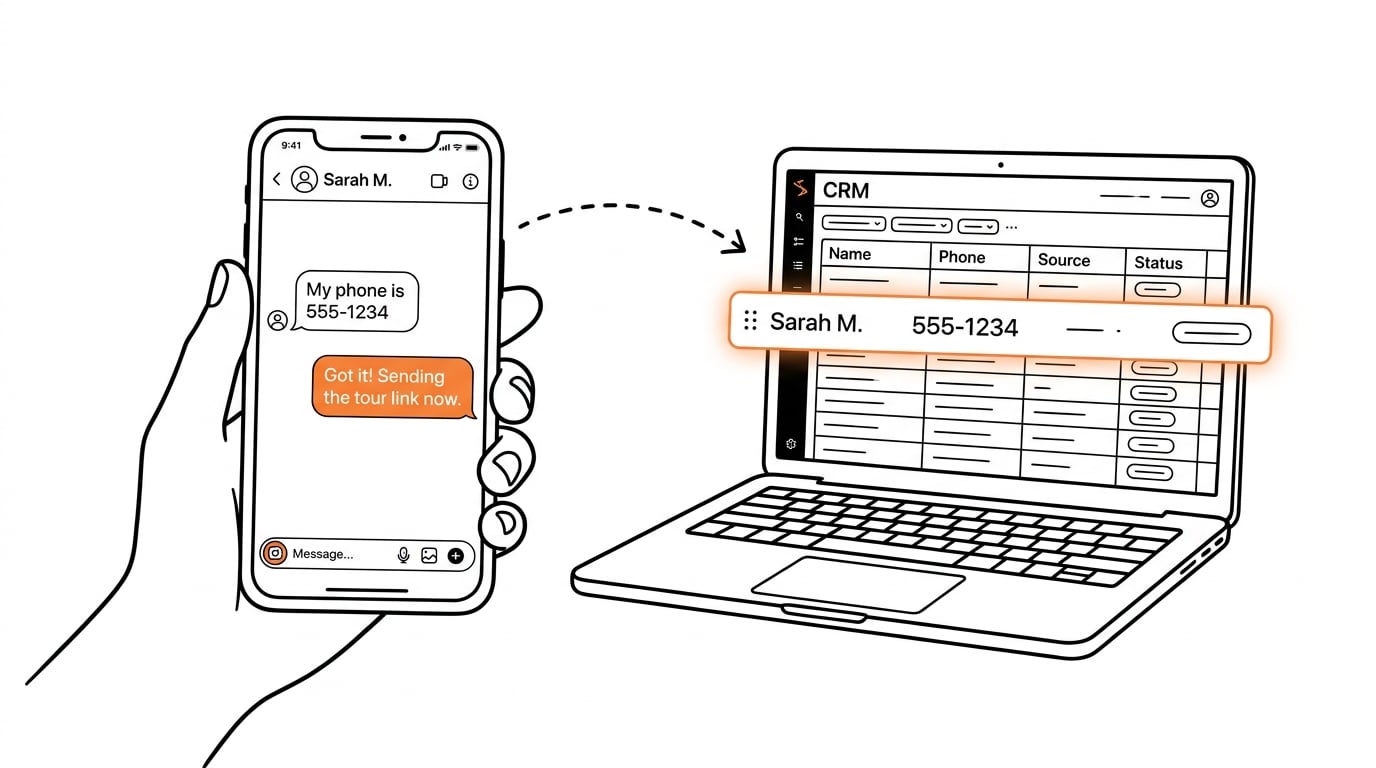
Every person who comments gets added to your CRM as a contact. Automatically. No data entry.

They’re tagged with:

  • “Interested – [Property Address]”
  • “Source: Instagram Comment – [Date]”
  • “Status: [Replied / No Reply / Showing Booked]”

This means even if they don’t book this showing, you have:

  • Their engagement history
  • What property they asked about
  • When they engaged
  • Whether they’re a fast responder or slow responder

Three months later when you get another East Austin listing, you can filter your CRM for “everyone who asked about East Austin properties” and send them a quick DM: “Hey [Name], remember when you asked about that bungalow on Oak Street? Just got a new listing two blocks away you might like.”

That’s not cold outreach. That’s following up with someone who already told you what they’re looking for.

Nurtured leads produce a 20% increase in sales opportunities on average. (Demand Gen Report)

The Psychology of Why This Actually Works

Let’s talk about why this converts so much better than manual follow-up.

1. Speed signals priority.
When you respond in under 60 seconds, the subconscious message is: “This agent prioritizes me.” When you respond in 3 hours, the message is: “This agent is busy.” Even if that’s not true, that’s what it feels like.

2. Specificity builds trust.
“I have showings at 4pm, 10am, or 2pm” sounds prepared. “When works for you?” sounds like you haven’t thought about it yet. The first option makes you seem organized. The second makes them do work (checking their calendar, suggesting times, waiting for your confirmation). People book with the agent who makes it easiest.

3. Automation removes decision fatigue.
Most agents don’t follow up consistently not because they’re lazy, but because every follow-up requires a decision: “Should I reach out? What should I say? Is it too soon? Too late?” With automation, the decision is made once. Then it runs forever.

4. The “comment to unlock” creates investment.
When someone types “SHOW” and hits send, they’ve made a micro-commitment. They’re not just passively liking your post – they took action. Psychologically, they’re more likely to follow through because they already invested effort (even if it was just typing 4 letters).

The Client Touchpoint Most Agents Miss Entirely

Here’s what separates top producers from everyone else: they stay visible between transactions with people who already know them.

Your past clients see your listing posts. Your sphere sees your market updates. But unless you’re manually DM’ing everyone who engages, you’re missing opportunities to reconnect.

Most agents think: “They liked my post. That’s nice.”

Top producers think: “They liked my post. That’s a signal. I should reach out.”

Automation makes this scalable:

Someone who bought from you 2 years ago likes your listing post?
Trigger: “Hey [Name]! Always good to see you keeping up with the market. How’s the house treating you? Thinking about moving or know anyone looking?”

But here’s the key insight most agents miss: Your past clients engaging with listings aren’t thinking about moving. They’re thinking about their home’s value.

So change the DM:
“Hey [Name]! Saw you liked the listing on Oak Street. We’re seeing crazy appreciation in your neighborhood right now – your place has probably gone up 15-20% since you bought. Want me to send you a quick market update for your area?”

Now you’re giving them something they actually want (their home value) instead of asking if they want to buy again (which feels pushy).

Someone saves multiple posts over 2 weeks?
Trigger: “Hey [Name], noticed you’ve been checking out a few East Austin listings. Want me to send you anything that matches what you’re looking for? I can keep an eye out.”

Repeat story viewer (3+ stories in a week)?
Trigger: “Hey [Name]! I keep seeing you on my stories. Looking for anything specific right now or just keeping tabs on the market?”

These aren’t cold outreach. They’re warm follow-ups with people who are already paying attention to you. You’re just systematizing the thing top agents do manually (and inconsistently).

What This Actually Looks Like in Practice (Real Timeline)

Let’s walk through what happens when you have this set up:

Monday 10:04am: You post a new listing. “Charming bungalow in Hyde Park. Comment SHOW to schedule a tour.”

Monday 10:14am: Sarah comments “SHOW 🏠”

Monday 10:15am (60 seconds later): Sarah gets a DM:
“Hey Sarah! Thanks for your interest in 2301 Pecan Street. I have showings available tomorrow at 2pm, Saturday at 10am, or Sunday at 4pm. Which works best for you?”

Monday 10:47am: Sarah replies “Saturday at 10 works!”

Monday 10:47am (immediately): Two things happen:

  1. Sarah gets a DM with calendar link: “Perfect! Here’s the link to confirm: [booking link]”
  2. Sarah gets an SMS: “Hi Sarah, this is [Your Name]. Just sent you the calendar link for Saturday at 10am. Looking forward to showing you 2301 Pecan!”

Monday 11:02am: Sarah clicks the calendar link, books the showing

Monday 11:02am: The showing goes on your calendar. Sarah gets added to your CRM, tagged “Showing Scheduled – Hyde Park Listing”

Where were you during all of this? In a listing appointment. You didn’t touch your phone once.

Saturday 9:00am: Sarah gets automated reminder text:
“Hi Sarah, this is [Your Name]. Looking forward to showing you 2301 Pecan Street at 10am today! I’ll meet you at the front door. Text me if you need anything.”

Saturday 10:00am: You meet Sarah at the showing.

From her perspective, you’re the most responsive agent she’s ever worked with. You replied in under a minute. You sent a reminder without her asking. You made booking easy.

She has no idea it was automated. And honestly? It doesn’t matter. Because when she shows up, you’re there. Not a bot. The automation just made sure she got there.

The Automations Most Agents Aren’t Using (But Should Be)

Beyond the basic comment-to-DM workflow, here are the setups that actually move the needle:

Open House Announcements

Post: “Open house this Sunday! Comment RSVP for the address and time”
Auto-DM: Sends address, time, and parking instructions
Saturday evening: Automated reminder text with directions
Monday after: “Hey [Name], thanks for coming by! What did you think? Want to see it again or talk through anything?”

This turns casual drive-bys into tracked leads in your CRM.

Price Drop Alerts

When you drop price on a listing, your CRM filters everyone who:

  • Commented on the original post
  • Saved the post
  • Clicked the link in your bio when that listing was featured

Auto-DM them: “Hey [Name], remember the Hyde Park bungalow? Just dropped to $485K (was $510K). Still interested?”

These are warm leads. They already showed interest. Now you’re giving them a reason to act.

New Listings by Area/Type

Someone asked about East Austin 3 months ago but didn’t buy?

When you get a new East Austin listing, your CRM triggers:
“Hey [Name], I know you were interested in East Austin back in August. Just got a new 3bed/2bath that just hit the market. Want me to send you the details?”

You’re not guessing what they want. You’re following up on what they told you they wanted.

Market Updates That Actually Convert

Post your monthly market stats. Track who engages (likes, comments, saves).

Auto-DM them the full report: “Hey [Name], saw you were checking out the October market update. Want me to send you the full breakdown? I can also pull specific numbers for your neighborhood if you’re curious what your place is worth.”

Most agents post market updates and hope someone reaches out. You’re reaching out to everyone who showed interest.

The Expired Follow-Up

Someone asked about a listing that went under contract. Auto-tag them “Interested – [Address] – Property Sold”

When you get something similar:
“Hey [Name], I know you were interested in that Clarksville condo that sold last month. Just listed one two streets over – same size, better price. Want to see it?”

This is where your CRM becomes a goldmine. You’re not letting leads go cold just because they didn’t buy the first property they asked about.

Common Mistakes That Kill Your Automation (And How to Avoid Them)

Here’s where agents screw this up:

Mistake #1: Using trigger words that are too common

Bad: “Comment HOME to see this property”
Why it fails: People comment “omg I love this home!” and trigger your workflow when they’re just being nice, not asking to see it

Good: Use specific, uncommon trigger words like SHOW, TOUR, INFO, DETAILS

Mistake #2: Sending the calendar link too early

Bad: First DM includes the booking link
Why it fails: They haven’t confirmed they’re actually interested. You’re asking them to commit before they’ve said yes

Good: First DM offers times. Second DM (after they confirm) sends the link.

Mistake #3: Making your DM sound like a bot

Bad: “Thank you for your interest. Please select a time.”
Why it fails: No one talks like that

Good: “Hey [Name]! Which of these times works best for you?” Write like you’re texting a friend.

Mistake #4: No follow-up sequence

Bad: One DM, then nothing
Why it fails: Most people don’t reply to the first message. Not because they’re not interested – because they’re busy

Good: Have a 3-touch sequence over 72 hours before you move them to long-term nurture

Mistake #5: Forgetting the people who don’t reply

Bad: If they don’t book a showing, delete them
Why it fails: They might not be ready now, but they showed interest. They’re worth nurturing

Good: Tag them, add them to monthly market updates, follow up when you get similar listings

Mistake #6: Same message for everyone

Bad: Generic template that doesn’t change based on context
Why it fails: A past client needs different messaging than a cold lead

Good: Segment your automations. Past clients get “How’s the house?” Cold leads get “Here are showing times.”

The Numbers That Show Why This Works

Let’s talk ROI with real math:

Average agent without automation:

  • 50 comments/DMs per month on listing posts
  • Responds to 15 of them (30% response rate)
  • Converts 3 to showings
  • Books 1-2 buyers from social per year

Agent with automated real estate social follow up:

  • Same 50 comments/DMs per month
  • Responds to all 50 (100% response rate)
  • Converts 18 to showings (because speed + specificity increases conversion)
  • Books 5-7 buyers from social per year

That’s 3-5 extra closings per year. At an average commission of $12,000/closing, that’s $36K-$60K in additional revenue.

Same posts. Same content. Different follow-up system.

And that’s just new leads. Add in:

  • Past clients who re-engage and refer friends
  • Sphere contacts who stay warm and buy/sell when timing’s right
  • The people who weren’t ready 90 days ago but are now (because you kept them in your nurture sequence)

The compounding effect is where this really pays off.

Setting This Up Takes Less Time Than You’re Thinking

You don’t need to be a tech person. You don’t need to code. You just need:

  1. A social CRM automation platform (like nurtureBEAST) that connects Instagram/Facebook to your CRM
  2. 30 minutes to build your first workflow: comment trigger → wait 60 seconds → auto-DM → calendar link
  3. Clear CTAs on your posts: “Comment SHOW to schedule a tour”

That’s it.

Most agents spend more time manually responding to DMs in a week than it takes to build an automation that handles it forever.

Start With One Workflow (Then Scale)

Don’t try to automate everything on day one. Start simple:

Week 1: Pick your best-performing listing post format. Add “Comment SHOW for showing times.” Set up the auto-DM with 3 specific time slots. See what happens.

Week 2: Add the follow-up sequence (24-hour reminder if they don’t reply).

Week 3: Add CRM tagging so everyone who comments gets tracked.

Week 4: Add the SMS confirmation for people who book.

Within a month you’ll have a system that:

  • Captures every lead
  • Responds to every comment in under 60 seconds
  • Never lets anyone slip through the cracks
  • Logs everything in your CRM for long-term follow-up

What Happens After You Set This Up

First week: You’ll get comments. Your automation will respond. You’ll feel weird not manually replying. You’ll check to make sure it’s working. It will be.

Second week: You’ll notice people are booking showings while you’re in other showings. Your calendar fills up without you touching your phone. You’ll start trusting the system.

Third week: Someone will tell you “Wow, you’re so responsive!” and you’ll realize they have no idea it was automated. You’ll stop feeling weird about it.

First month: You’ll look at your CRM and see 40+ new leads that you would have missed entirely if you were doing this manually. Some booked showings. Some didn’t reply. But all of them are captured, tagged, and in your database for follow-up.

Three months: You’ll get a message from someone you DMed 90 days ago: “Hey, remember when I asked about that East Austin listing? I’m ready to start looking seriously now. Can we talk?”

That’s the lead you would have lost forever if you hadn’t captured them the first time they showed interest.

The point isn’t to remove yourself from the conversation. It’s to remove the delay. You’re still showing up to the appointments. You’re still building relationships. You’re still closing deals.

You’re just not losing leads because you were busy being a good agent.


Start your free trial of nurtureBEAST and build your first social follow-up workflow in under 30 minutes. No credit card required. Just connect your Instagram account and post your next listing with a comment trigger.

Your competition is still manually checking DMs between showings.

You’ll be booking appointments while you’re closing other deals.

Further reading: How to Automate Your Real Estate Follow-Up | Real Estate CRM: Do You Actually Need One? | What’s Killing Your Real Estate Business? (Free Assessment)

Further reading: The Weekly CRM Cleanup Routine for Real Estate Agents | nurtureBEAST vs. Follow Up Boss: Which Is Right for You? | How Vantage Media Uses GoHighLevel to Close More Deals

Further reading: Real Estate Marketing Automation | AI for Real Estate Agents

Text messages have a 98% open rate vs. 20% for email. (Gartner)

Leave a Comment

Your email address will not be published. Required fields are marked *

Scroll to Top